

Table of Contents
Your username is your identity in the marketplace and how other users recognize you. You can change it anytime through your account settings.
Username Change Policy #
You can change your username once every 90 days. After making a change, you’ll need to wait 90 days before changing it again. This helps maintain a stable reputation history while giving you flexibility to refresh your identity.
How to Change Your Username #
- Click your profile icon in the top right corner of the website
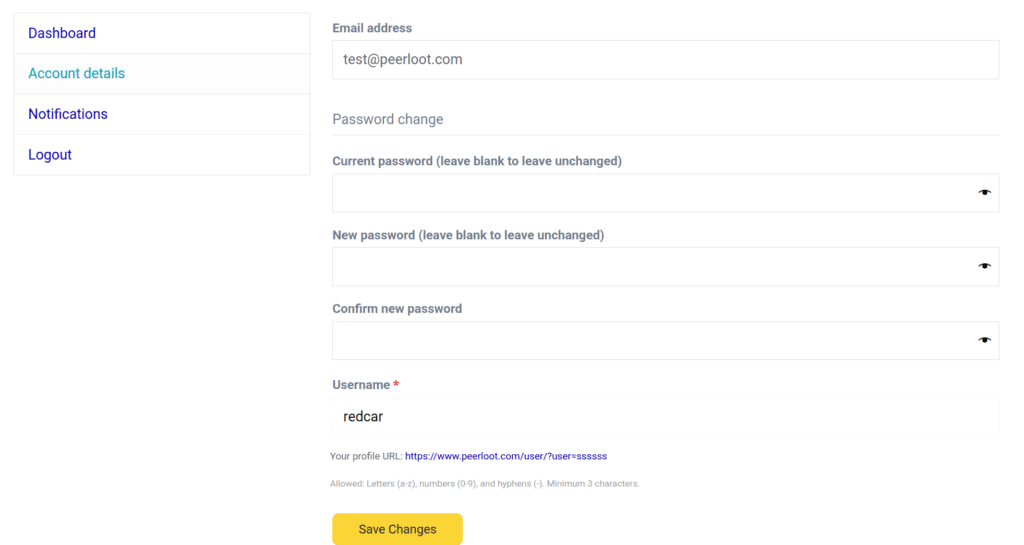
- Select Account Details
- Find the username field and enter your new username
- Save your changes
Your new username will take effect immediately and be visible across the marketplace.
Things to Keep in Mind #
Your username is an important part of your marketplace presence. Choose one that represents you well, since you’ll only be able to change it again after 90 days have passed. Make sure your new username follows our community guidelines and isn’t already taken by another user.


